Best estimate and invoice apps for contractors (2026): 8 options compared
Invo, Joist, Invoice2go, Invoice Simple, Square Invoices, Jobber, QuickBooks Online, and spreadsheets compared on price, invoice limits, estimating, and who each one actually fits.
Short answer: if you work alone and write estimates on site, you want a mobile estimating app: Invo or Joist. If you mostly send simple invoices, Invoice Simple, Invoice2go, or Square Invoices costs less. If you run a crew and need scheduling and dispatch, an invoicing app isn't enough; look at Jobber. And if your accountant lives in QuickBooks, invoice from QuickBooks Online or from an app that syncs with it.
Invo makes this page, and Invo is one of the options. We tried to make the comparison useful even if you pick something else: every app gets a "best for" line and an honest tradeoff, Invo included.
The 8 options at a glance
| App | Best for | Starting price | Main tradeoff |
|---|---|---|---|
| Invo | Solo contractors and small crews pricing jobs on site, in several languages and currencies | Plans shown in the app | App Store only; no built-in card processing or scheduling |
| Joist | US solo contractors who write estimates on site | $10/mo (Basics, 5 documents a month) | Unlimited documents start at $17/mo; scheduling only on the $100/mo Run plan |
| Invoice2go | Small businesses that want invoicing plus a business bank account | $7.99/mo (Starter, 2 invoices a month) | Unlimited invoices need Premium at $44.99/mo |
| Invoice Simple | Owners who send a few invoices a month from a phone | $6.99/mo (Essentials, 3 invoices a month) | Built for billing, not estimating; caps are tight on low plans |
| Square Invoices | Businesses that want free invoicing and pay only card fees | $0/mo per location | Not contractor-specific; paid upgrades are priced per location |
| Jobber | Service businesses that need booking, scheduling, and a client hub | $49/mo, or $29/mo billed annually (Core, 1 user) | Markups on quotes and job costing start on Grow ($299/mo, up to 5 users) |
| QuickBooks Online | Owners who want invoices and bookkeeping in one place | $38/mo (Simple Start) | Accounting software; slow on a phone at the jobsite |
| Spreadsheet + PDF | One-off jobs | Free | No payment history, no reports, easy to make math mistakes |
Competitor prices are the vendors' published monthly prices as of late September 2026. Software prices change often — check each vendor's pricing page before you buy. Invo's current plans and prices are shown in the app.
First, decide what kind of app you need
"Invoice app" covers three different products, and most bad purchases come from buying the wrong kind.
- Mobile estimating apps (Invo, Joist) are built around the estimate. You price the job in line items with markup, tax, and a deposit, get a signature, and turn the same lines into the invoice. Best when you walk the job, measure, and price on the spot.
- Invoicing apps (Invoice Simple, Invoice2go, Square Invoices) are built around the invoice. Estimates exist, but the strength is getting paid: payment links, card processing, reminders.
- Business platforms (Jobber, QuickBooks Online) run more of the business — scheduling, dispatch, client portals, or full bookkeeping. They cost more and take longer to set up, and they pay off once you have a crew or an accountant.
Ask yourself one question: where does the number come from? If it comes from your walkthrough, a mobile estimating app saves the most time. If the price is fixed and you just need to bill it, an invoicing app is enough. If the job has to be booked, scheduled, and dispatched, you need a platform.
Feature comparison for contractors
| Feature | Invo | Joist | Invoice2go | Invoice Simple | Square | Jobber |
|---|---|---|---|---|---|---|
| Estimates and invoices | Yes | Yes | Yes | Yes | Yes | Yes |
| Line items with quantity and unit | Yes | Yes | Yes | Yes | Yes | Yes |
| Markup on the estimate | Yes | Yes | Not listed | Not listed | Not listed | Grow plan |
| Deposits and payment history | Yes | Yes | Yes | Premium | Payment schedules on Plus | Yes |
| Customer signature | Yes | Yes | Not listed | Premium | Contracts | Yes |
| Branded PDF templates | 6 templates | Yes | Yes | Yes | Custom templates on Plus | Yes |
| Reports (billed, collected, overdue) | Yes | Elite plan | Professional plan | Plus plan | Not listed | Yes |
| Built-in card payments | No | Yes | Yes | Yes | Yes | Yes |
| Scheduling and dispatch | No | Run plan | No | No | No | Yes |
| Currencies | USD, EUR, GBP, TRY | Not listed | Not listed | Not listed | Not listed | Not listed |
| App languages | 7 | English | Not listed | Not listed | Not listed | Not listed |
"Not listed" means the feature isn't on the vendor's public plan pages, not that it can't exist. Check with the vendor if a row decides it for you.
Each app, one by one
Invo
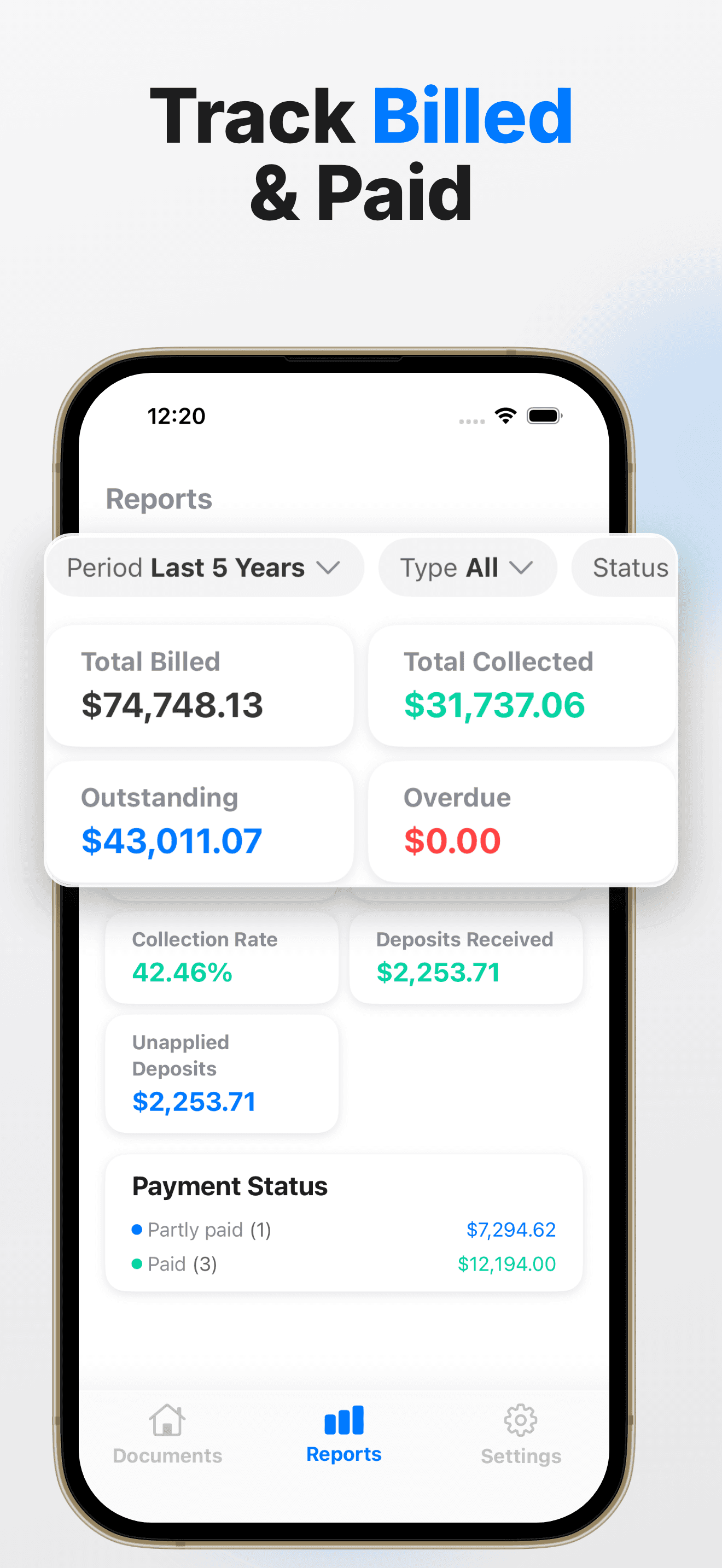
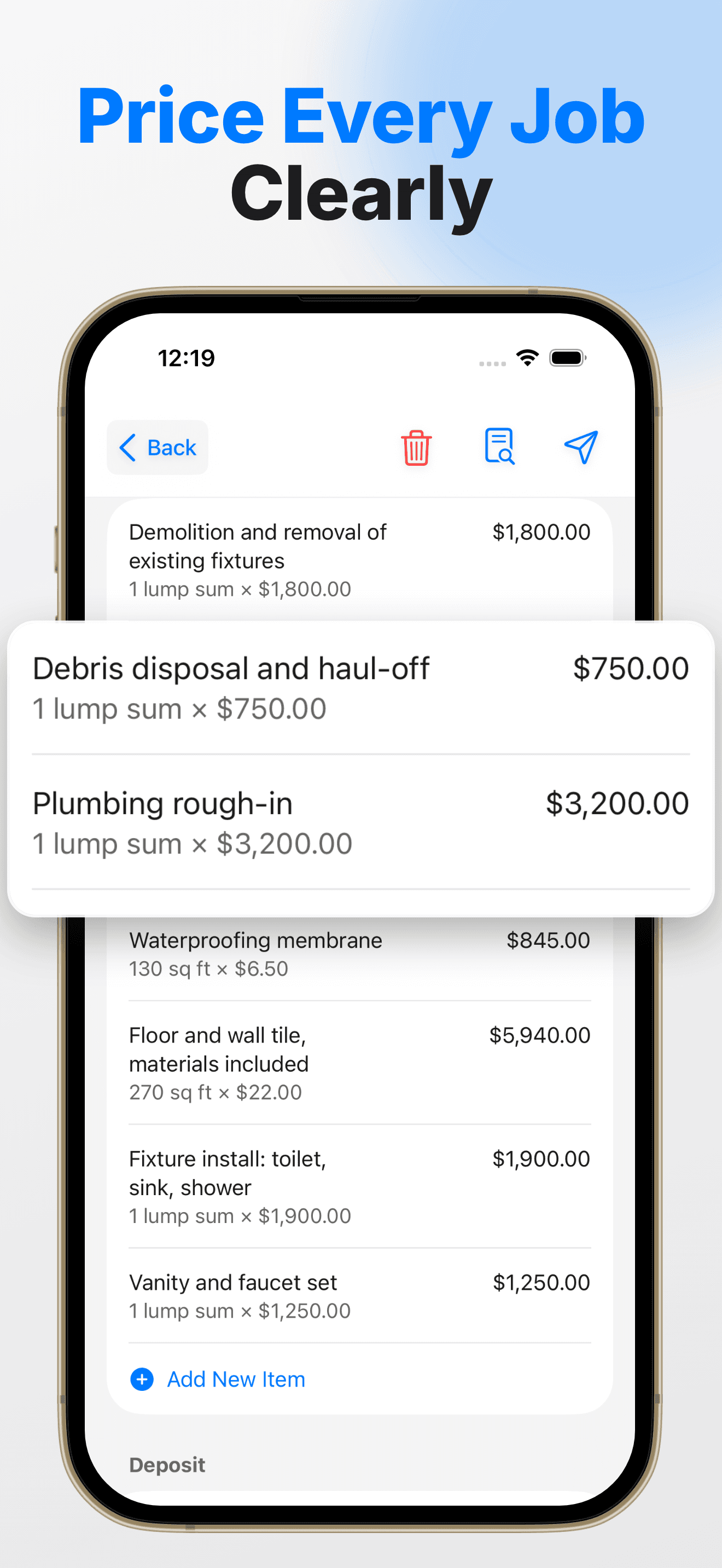
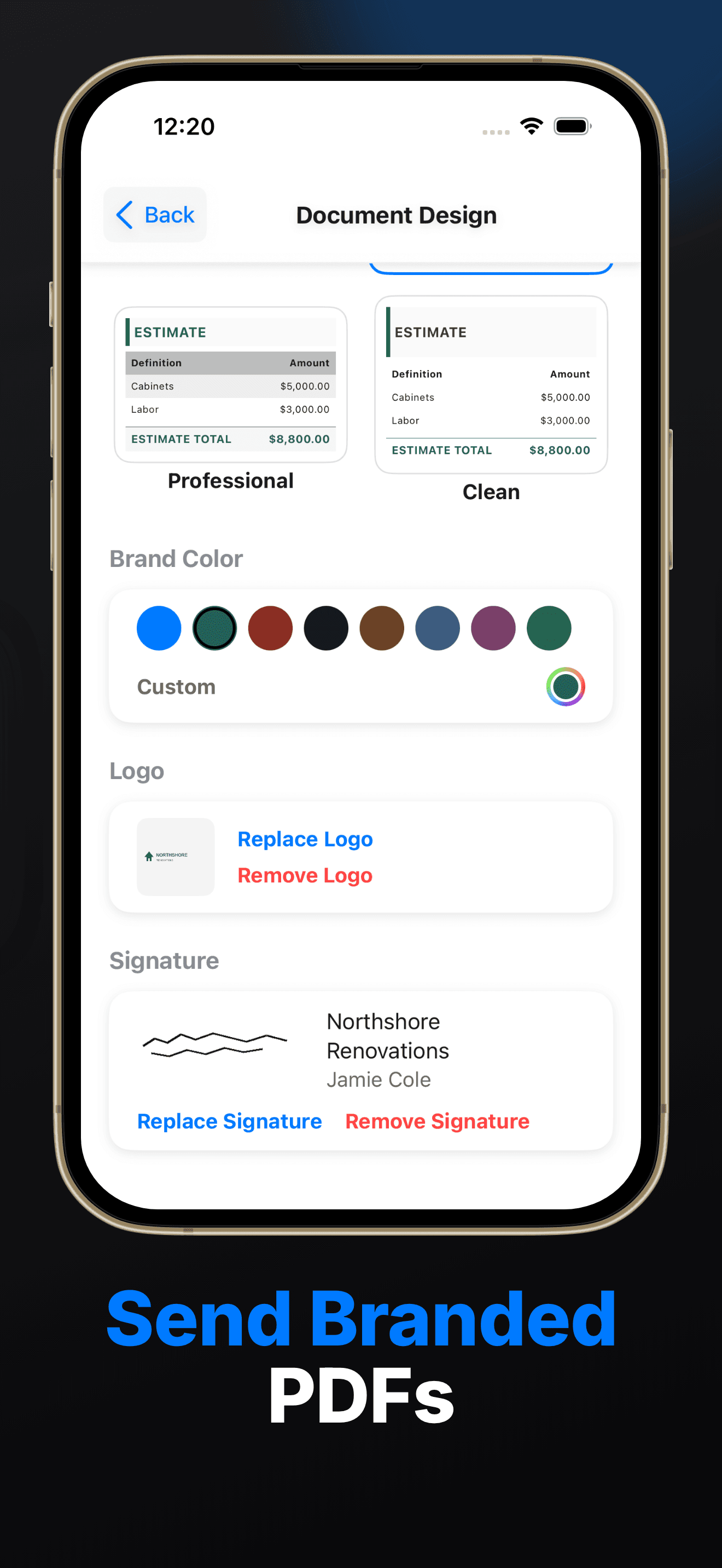
Invo is an iPhone app for writing estimates, quotes, and invoices on site. You build the job from line items with quantity, unit, and unit cost; add markup, sales tax, and a deposit; capture a signature; and send a branded PDF with your logo and color in one of six templates. The same lines carry over to the invoice, and every deposit and payment is recorded on the document. Reports show what was billed, collected, outstanding, and overdue, and you can search by title, customer, location, or document type.
Two things set it apart from the US-centric apps. It works in seven languages (English, German, Spanish, French, Portuguese, Brazilian Portuguese, and Turkish), and it bills in USD, EUR, GBP, and TRY. An optional AI assistant can draft a first pass of a document; you review and edit everything before it goes out.
Best for: solo contractors, handymen, and small remodeling crews who price on site, especially outside the US or across languages.
Tradeoff: it's on the App Store only, with no Android or web version. It doesn't process card payments: you record payments you collect elsewhere. There's no scheduling or dispatch, and no accounting sync listed. If you need any of those, pick Joist, Jobber, or QuickBooks.
Joist
Joist is the best-known estimate-to-payment app for individual contractors in the US. Basics is $10/mo for up to 5 documents a month, Pro is $17/mo for unlimited documents, and Elite is $32/mo, adding change orders, business reports, and QuickBooks sync. Run, the newest plan, adds job organizing and visit scheduling at $100/mo list price. Customers can pay by card, PayPal, Venmo, Apple Pay, or Google Pay, and Joist offers homeowner financing.
Best for: US-based solo contractors who want estimates, online payments, and financing in one app.
Tradeoff: five documents a month on Basics is tight for a busy week, and scheduling only comes with the most expensive plan. It's built around one contractor rather than a crew.
Invoice2go
Invoice2go pairs invoicing with a built-in business bank account and debit card. Starter is $7.99/mo for 2 invoices a month, Professional is $11.99/mo for 5 a month with QuickBooks and Xero integration and advanced reports, and Premium is $44.99/mo for unlimited invoices. Every plan includes unlimited estimates, and card fees run from 2.9% to 3.5% depending on the plan.
Best for: small service businesses that send many estimates but relatively few invoices, and want banking in the same app.
Tradeoff: more than five invoices a month on monthly billing means Premium at $44.99/mo, and it isn't built specifically around contractor pricing (markup, deposits on the estimate).
Invoice Simple
Invoice Simple is a mobile-first invoicing app priced by how many invoices you send. Essentials is $6.99/mo for 3 invoices a month, Plus is $14.99/mo for 10 a month with photos, your signature, and reports, and Premium is $21.99/mo for unlimited invoices with client signatures and deposits.
Best for: owners who send a handful of simple invoices a month and want the cheapest clean PDF.
Tradeoff: it's built for billing, not estimating, and deposits and client signatures only come on the top plan.
Square Invoices
Square includes invoicing in its general plans. Square Free costs $0 a month and includes invoices, recurring invoices, estimates, and contracts; you pay only processing fees (2.6% + 15¢ in person, 3.3% + 30¢ online). Square Plus at $49/mo per location adds payment schedules and custom templates.
Best for: anyone who mainly wants to get paid by card at the lowest fixed cost.
Tradeoff: it's a general business tool, not a contractor estimating tool, and paid upgrades cover all of Square at a per-location price.
Jobber
Jobber is an all-in-one platform for home service businesses: online booking, quotes, scheduling, invoices, payments, and a client hub. Core is $49/mo for one user ($29/mo billed annually); Connect adds QuickBooks and Xero sync and automated client notifications; Grow adds optional line items, markups on quotes, and job costing.
Best for: service businesses with recurring visits, a team, and a calendar to run.
Tradeoff: it's much more than a solo contractor needs, and contractor-pricing features like markups on quotes sit on the higher plans.
QuickBooks Online
QuickBooks Online is accounting software with invoicing built in. Simple Start is $38/mo for one user, and higher plans add users, project profitability, and batch invoicing.
Best for: owners whose accountant already works in QuickBooks and who want invoices to land straight in the books.
Tradeoff: it's built for the office, not the jobsite. Building a line-item estimate on a phone is slower than in a dedicated estimating app. Many contractors estimate in one app and sync or re-enter the invoice in QuickBooks.
Spreadsheet + PDF
A spreadsheet template exported to PDF costs nothing and works for the occasional job.
Best for: your first few jobs, or a once-a-year side project.
Tradeoff: there's no payment history, no reports, no signature, and no protection against a broken formula. The time you lose retyping estimates into invoices costs more than an app within a few jobs.
Which one should you choose?
- You price jobs on site and work alone or with a small crew: Invo or Joist. Choose Joist if you're in the US and want card payments and financing in the same app. Choose Invo if you work in more than one language, bill in EUR, GBP, or TRY, or want deposits, signatures, and reports without moving up plan tiers.
- You send a few simple invoices a month: Square Free, Invoice Simple Essentials, or Invoice2go Starter.
- You need to get paid by card, fast: Square, Invoice2go, or Joist.
- You run a crew with a schedule: Jobber.
- Your accountant runs everything in QuickBooks: QuickBooks Online, or an estimating app plus QuickBooks for the books.
What to look for before you pay
- Monthly document caps. Many entry plans allow 2 to 5 documents a month. Count your busiest month, not your slowest.
- Markup on the estimate. If you price from cost, the app should show cost, markup, and price, not just a final number. Our markup vs margin guide explains why that matters.
- Deposits recorded on the document. The final invoice should subtract the deposit automatically. See how much deposit to ask for.
- Estimate to invoice without retyping. The approved estimate's lines should become the invoice. Here's how that flow should work.
- Signature on site. A signed estimate prevents most "I never agreed to that" conversations.
- Your language and currency. If you work outside the US, check that the PDF your customer sees is in their language and currency.
- Card fees vs subscription. A cheaper plan with higher card fees can cost more on large jobs.
FAQ
What is the best estimate app for a solo contractor?
For on-site estimating, Invo and Joist are built for exactly this: line items, markup, tax, deposits, a signature, and a branded PDF from your phone. Joist is the stronger pick if you want built-in card payments in the US; Invo is the stronger pick across languages and currencies.
Is there a free invoicing app for contractors?
Square Free has no monthly fee; you pay processing fees when customers pay by card. Most contractor-focused apps offer a trial or a limited entry plan instead.
Do I need an invoicing app if I use QuickBooks?
Not necessarily. QuickBooks Online can send invoices. Contractors usually add an estimating app because building a detailed estimate on a phone at the jobsite is faster there.
Can I take card payments in Invo?
No. Invo records deposits and payments you collect, and its reports track what's billed, collected, outstanding, and overdue. If built-in card processing is essential, look at Joist, Invoice2go, Square, or Jobber.
Which app is best for contractors outside the US?
Check three things: the language of the PDF your customer sees, the currencies supported, and tax handling. Invo supports seven languages and USD, EUR, GBP, and TRY. Most US-built apps are English-first.